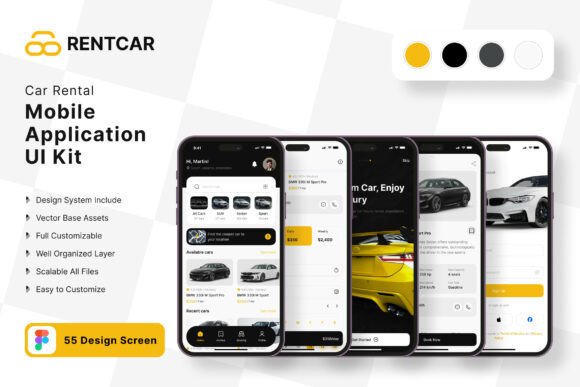
Car Rental Application Mobile UI KIT: A Complete Design Solution
Imagine launching a polished, professional mobile application in a fraction of the usual time. That’s the promise of a well-crafted UI kit, and this comprehensive collection is designed to turn your vision for a car rental or ride-sharing service into a tangible, beautiful reality. It’s more than just a set of screens; it’s a foundational design asset that provides the structure and style needed to build a seamless user experience from the ground up.
This particular Car Rental Application Mobile UI KIT stands out by offering an impressive suite of 55 pixel-perfect screen designs. Each template is meticulously crafted in Figma, ensuring a modern typography and clean layout that aligns with current design trends. The kit isn't limited to just the car rental niche; its flexible components make it an excellent starting point for any on-demand service app, from bike sharing to scooter rentals. The value lies in its adaptability, allowing you to customize every element to match your unique brand identity.
Creative Flexibility and Practical Design Assets
At its core, this UI kit is built for creative professionals who need both efficiency and control. The collection includes over 80 UI elements, all presented as 100% vector layers and scalable vectors. This means every icon, button, and graphic can be resized without losing quality, making it a perfect choice for responsive web design and high-resolution displays. The inclusion of free icon vectors and symbol objects streamlines the workflow, allowing for rapid prototyping and iteration.
The design flexibility is a key feature. You can easily change color styles to align with a specific brand palette, swap out elements, and reconfigure layouts. This makes it a valuable tool for a range of projects beyond a primary car rental app. Consider using these templates for:
- Logo and Branding Mockups: Visualize how your app icon and color scheme work within a real interface.
- Social Media Graphics: Create consistent, on-brand promotional materials for app launches or features.
- Pitch Decks and Presentations: Showcase a professional prototype to investors or clients.
- Web Design Inspiration: The clean, modern layout can inform the design of a companion website.
Tips for Integrating This UI Kit into Your Workflow
To get the most out of this design resource, start by planning your app’s user flow. Map out the core journey—from searching for a vehicle to completing a booking—and select the relevant screens from the kit. The fully layered structure in Figma makes it simple to isolate and edit specific components. A practical tip is to establish your brand’s color style and typography first. The kit uses free fonts, so you can maintain consistency or experiment with complementary typefaces for headings and body text.
Remember, while the templates provide a complete framework, the real magic happens during customization. Adjust spacing, refine micro-interactions, and add your own content to make the application feel unique. The 100% vector nature ensures that every adjustment is crisp and clean. Always review the license to confirm it fits your intended use, especially for commercial projects. A high-quality UI kit like this doesn’t just save time; it elevates the entire design process, ensuring visual consistency and a professional presentation that builds user trust from the first tap.
Choosing the right design assets is crucial for creating a cohesive and effective digital product. This collection provides a robust, scalable, and beautifully designed foundation that empowers you to build a mobile application that is not only functional but also visually compelling. It’s an investment in quality that pays dividends in user experience and brand perception.