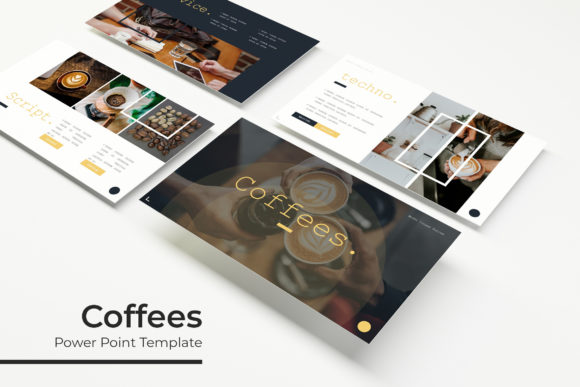
Coffees Power Point Template: A Modern Design Asset
Presentations often fall flat when they rely on generic slides and uninspired layouts, but the right template can instantly elevate your message. The Coffees Power Point Template is a versatile design asset built for creators who value both aesthetics and functionality. With over 150 total slides across five premade color themes, it offers a comprehensive foundation for crafting professional presentations that capture attention and communicate ideas clearly.
Each of the five color variations includes 30 carefully designed slides, providing ample room to structure content, showcase data, and maintain visual consistency. The template includes handcrafted infographics, section break slides, and dedicated gallery and portfolio layouts—making it suitable for a wide range of projects. Whether you’re preparing a business pitch, a creative portfolio, or an educational lecture, the design flexibility here helps streamline the process.
Practical Features for Efficient Design
One of the standout aspects of this template is its focus on usability. Built on master slides, it allows for quick global edits, ensuring that changes to fonts, colors, or layouts apply seamlessly throughout the presentation. The graphics are resizable and editable, with picture placeholders that support drag-and-drop functionality. This means you can easily insert your own images without disrupting the overall design integrity.
Pixel-perfect illustrations are included to enhance visual storytelling, helping to break up text-heavy slides and reinforce key points. For those working in Keynote, the template also comes with dedicated KEY files, offering cross-platform compatibility. The inclusion of a README file and links to free fonts used in the design further simplifies the setup process, allowing you to get started right away.
Creative Applications and Project Suitability
This template isn’t limited to corporate use. Its clean, modern typography and balanced layouts make it a strong choice for various creative projects. Consider using it for:
- Brand presentations and identity decks that require a polished, professional look.
- Editorial design projects, such as lookbooks or digital magazines, where visual flow matters.
- Social media graphics and campaign pitches that need cohesive, on-brand slides.
- Packaging design presentations or product launch materials that benefit from structured infographics.
- Web design proposals or UX case studies where clarity and visual hierarchy are essential.
The versatility of the Coffees Power Point Template makes it a practical addition to any designer’s toolkit. It helps maintain visual consistency across multiple slides, which is crucial for brand recognition and professional communication.
Tips for Maximizing the Template
When using any design asset, it’s important to adapt it to your specific needs. Start by selecting a color theme that aligns with your project’s mood—whether it’s warm and inviting or sleek and corporate. Take advantage of the master slides to ensure font pairings and color schemes remain consistent. Test the readability of your content at different screen sizes, especially if the presentation will be viewed on various devices.
While the template provides a strong structure, don’t hesitate to customize layouts to better fit your narrative. Swap out placeholder images with your own photography or illustrations, and use the infographic elements to simplify complex data. Always check that the included fonts are suitable for your intended use, particularly if the project involves commercial applications.
Choosing a well-designed presentation template is about more than just aesthetics—it’s about finding a tool that enhances your workflow and elevates your content. The Coffees Power Point Template offers a blend of creative design and practical features, making it a worthwhile consideration for anyone looking to deliver impactful, visually cohesive presentations. Its attention to detail and flexibility can help transform standard slides into a memorable visual experience.