Timora: A Clean Calendar Dashboard for Modern Scheduling
Finding the right interface for a productivity or scheduling application can be a challenge. You need something that feels both functional and inviting. The Timora Calendar Dashboard is a UI kit designed to meet that need, offering a polished and practical starting point for developers and designers building calendar management tools.
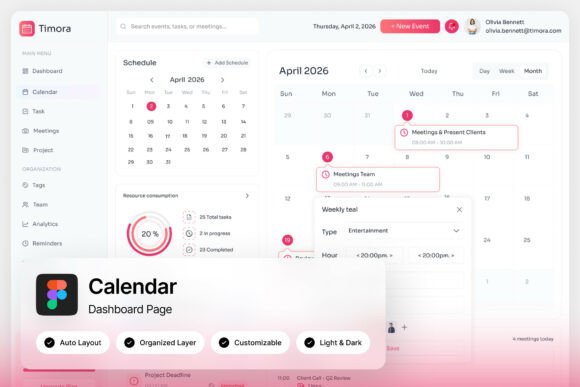
At its core, Timora provides a clean, well-structured layout for organizing schedules. It features clear monthly views, event cards, task timelines, and appointment summaries. The design uses a soft pink-gradient and white palette, which creates a visually warm environment without sacrificing the clarity needed for daily planning. This balance makes it a strong foundation for any scheduling SaaS or event planning platform.
Key Features and Design Flexibility
This design asset is built for ease of use and customization. The package includes two high-quality admin dashboard screens at a 1440×1024 pixel resolution, ensuring a crisp display. Every element is pixel-perfect, with layers that are well-organized, named, and grouped, which simplifies the editing process in tools like Figma. The inclusion of free Google Fonts and both light and dark mode interfaces further extends its versatility, allowing it to adapt to different brand aesthetics and user preferences.
For a creative team or a solo developer, this kind of ready-made dashboard template can significantly accelerate the workflow. Instead of starting from a blank canvas, you have a functional and attractive system to build upon.
Practical Uses for Designers and Developers
The value of a well-designed UI kit like Timora extends beyond its immediate function. Its modern typography and clean lines can inform broader design decisions for a project. Consider these applications:
- Productivity Apps: Use the dashboard as the central hub for a task management or time-blocking application.
- SaaS Platforms: Integrate the calendar view into a larger suite of business tools for project management or client scheduling.
- Event Planning Websites: Adapt the event cards and timeline features for a public-facing event calendar or booking system.
- Internal Tools: Build a custom admin panel for team scheduling, resource booking, or shift management.
The soft color scheme and structured layout also make it a useful reference for web design projects that require a friendly yet professional brand identity. Its approach to visual hierarchy can inspire better editorial design or social media graphics where clarity is key.
Tips for Choosing and Implementing a UI Kit
When selecting a design asset like this, think about your project's specific needs. First, ensure the overall mood matches your brand. The warm palette of Timora suits apps aiming for an approachable, user-friendly feel. Second, check the font pairing options. The included Google Fonts are a great starting point, but you should test how they pair with your own brand's typeface for headings or body text. Finally, verify that the license allows for your intended commercial use, a crucial step for any commercial font or design assets download.
A cohesive and well-executed interface builds user trust. By starting with a solid, customizable foundation like the Timora Calendar Dashboard, you can focus more on developing unique features and less on reinventing basic UI components. This approach leads to a more polished, professional final product that stands out in a crowded market.